GuideStart here
Run a local Unity Catalog server
Start one of the docs' Docker Compose environments, a single-user Unity Catalog server on localhost:8080 on its own or with a local stand-in for Amazon S3 and a PostgreSQL metastore, and know what each one runs.
Every example in these docs runs against a local
Unity Catalog server that you start with Docker
Compose. The docs ship several environments, each its own download. Each
runs the same single-user server on http://localhost:8080, potentially with
additional services like PostgreSQL or S3 enabled.
Choose an environment
| Environment | Use it for | Host ports |
|---|---|---|
| Minimal server | Most pages: catalogs, schemas, tables, volumes, functions, and engines on local files | 8080 |
| Server with simulated S3 | S3 storage, storage credentials, credential vending, and metadata in PostgreSQL that survives a new or upgraded server container | 8080, 9000 |
Every page's prerequisites name the environment it runs against. Run one
environment at a time: they share the compose project uc-docs and the
container name unitycatalog, so starting one replaces the server of another.
The commands below download each environment into uc-docs-env/ in the current
folder, and the server mounts its configuration from there. On Colima and
other VMs that share only your home directory, run them from a folder under
your home directory, or the server fails with a not a directory mount error.
Start the minimal server
curl -fsSL https://docs.unitycatalog.io/env/unitycatalog.tar.gz | tar -xz
cd uc-docs-env/unitycatalog && docker compose up -d --wait
export UNITY_CATALOG_URL=http://localhost:8080/api/2.1/unity-catalog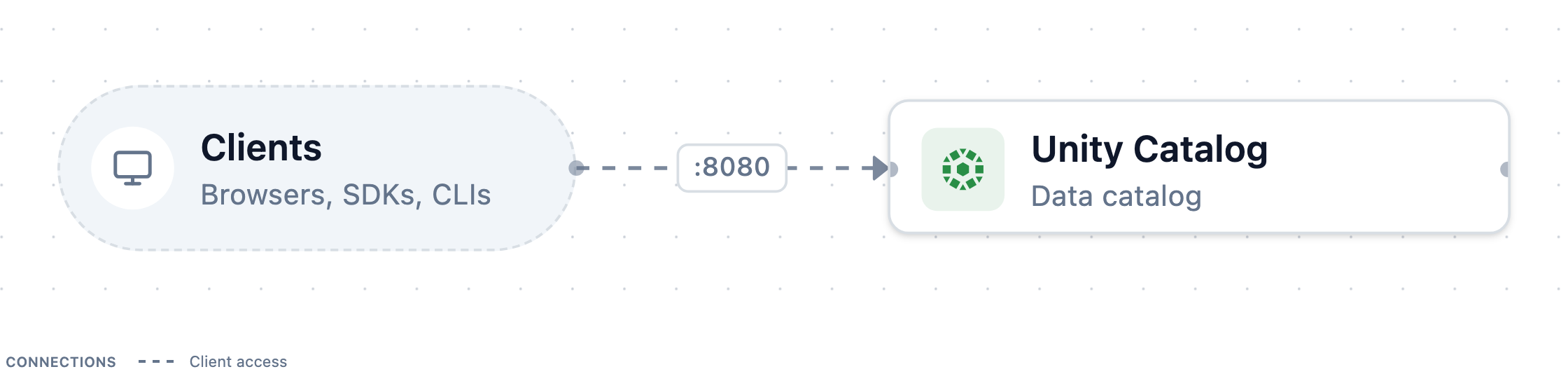
docker compose up --wait returns once the server reports healthy. The server
builds from the upstream release image, with two fixes for running on Linux.
Both environments are generated by Trestle:
compose.yaml includes one file per service under modules/, and
LAYOUT.md lists the routes and services. The server's part:
# Unity Catalog
services:
  unitycatalog:
    container_name: unitycatalog
    # Built locally from the render root, tagged with the `image` knob.
    build:
      context: ./image
    pull_policy: build
    image: uc-docs-unitycatalog:0.7.0
    # The server ignores SIGTERM as PID 1.
    init: true
    restart: unless-stopped
    depends_on:
      unitycatalog-mounts:
        condition: service_completed_successfully
    secrets:
      - source: unitycatalog_server_properties
        target: /home/unitycatalog/etc/conf/server.properties
    volumes:
      - ${UC_DOCS_ROOT:-/tmp/uc-docs}:${UC_DOCS_ROOT:-/tmp/uc-docs}
    expose:
      - "8080"
    ports:
      - "8080:8080"
    healthcheck:
      test:
        ["CMD-SHELL", "wget -q --spider http://127.0.0.1:8080/api/2.1/unity-catalog/catalogs || exit 1"]
      interval: 10s
      timeout: 5s
      retries: 12
      start_period: 15s

  # One-shot: Docker creates a missing bind source owned by root, so open the paths up for
  # the server and for host-side clients that write to the same directories.
  unitycatalog-mounts:
    image: python:3.13-alpine
    user: root
    restart: "no"
    entrypoint:
      - chmod
      - "0777"
      - "${UC_DOCS_ROOT:-/tmp/uc-docs}"
    volumes:
- ${UC_DOCS_ROOT:-/tmp/uc-docs}:${UC_DOCS_ROOT:-/tmp/uc-docs}# Generated by trestle. A local, single-user server: authorization is disabled, so never use
# this configuration for a shared server.
server.env=dev
server.authorization=disableStart the server with simulated S3
curl -fsSL https://docs.unitycatalog.io/env/uc-aws.tar.gz | tar -xz
cd uc-docs-env/uc-aws && docker compose up -d --wait
export AWS_ALLOW_HTTP=true
export AWS_ENDPOINT_URL=http://localhost:9000
export AWS_ENDPOINT_URL_S3=http://localhost:9000
export AWS_REGION=us-east-1
export UNITY_CATALOG_URL=http://localhost:8080/api/2.1/unity-catalog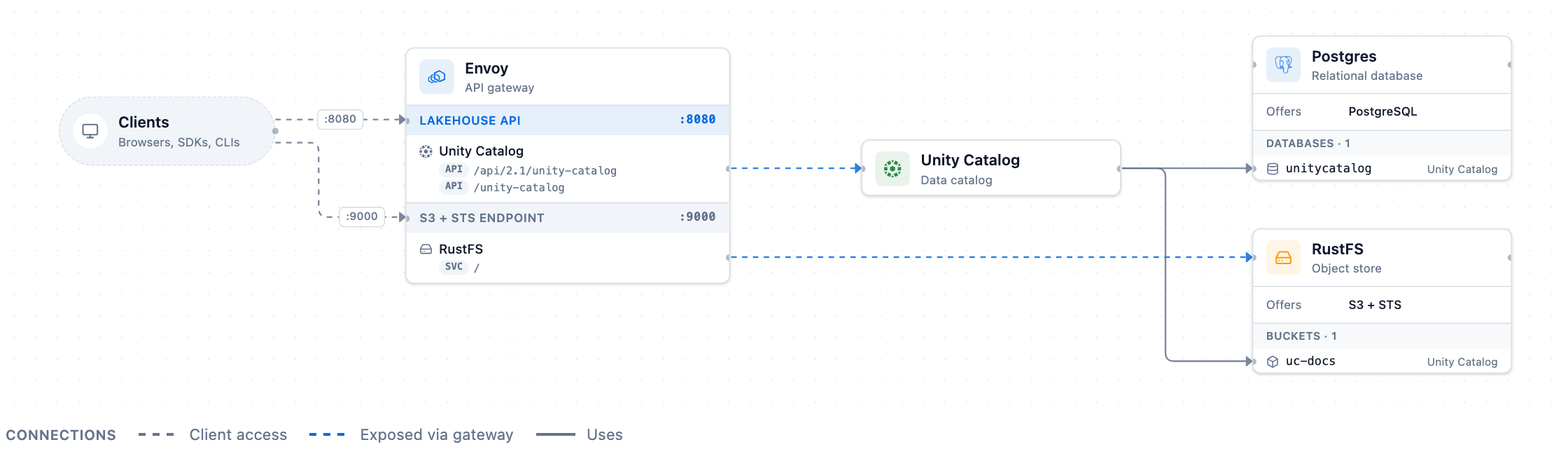
The simulated STS enforces the session policy that the server attaches to the credentials it vends. It doesn't check IAM trust policies or external IDs, so verify those on real AWS.
The server's part, with its AWS master role and the gateway's certificates:
# Unity Catalog
services:
  unitycatalog:
    container_name: unitycatalog
    # Built locally from the render root, tagged with the `image` knob.
    build:
      context: ./image
    pull_policy: build
    image: uc-docs-unitycatalog:0.7.0
    # The server ignores SIGTERM as PID 1.
    init: true
    restart: unless-stopped
    depends_on:
      db:
        condition: service_healthy
      rustfs-init:
        condition: service_completed_successfully
      gateway-certs:
        condition: service_completed_successfully
      unitycatalog-mounts:
        condition: service_completed_successfully
    secrets:
      - source: unitycatalog_server_properties
        target: /home/unitycatalog/etc/conf/server.properties
      # Points the metadata store at the relational_db provider instead of the built-in H2.
      - source: unitycatalog_hibernate_properties
        target: /home/unitycatalog/etc/conf/hibernate.properties
    environment:
      # Trust the gateway's local CA, which answers the AWS STS/S3 hostnames UC calls.
      JAVA_TOOL_OPTIONS: -Djavax.net.ssl.trustStore=/certs/truststore.p12 -Djavax.net.ssl.trustStorePassword=changeit
    volumes:
      - gateway-certs:/certs:ro
      - ${UC_DOCS_ROOT:-/tmp/uc-docs}:${UC_DOCS_ROOT:-/tmp/uc-docs}
    expose:
      - "8080"
    healthcheck:
      test:
        ["CMD-SHELL", "wget -q --spider http://127.0.0.1:8080/api/2.1/unity-catalog/catalogs || exit 1"]
      interval: 10s
      timeout: 5s
      retries: 12
      start_period: 15s

  # One-shot: Docker creates a missing bind source owned by root, so open the paths up for
  # the server and for host-side clients that write to the same directories.
  unitycatalog-mounts:
    image: python:3.13-alpine
    user: root
    restart: "no"
    entrypoint:
      - chmod
      - "0777"
      - "${UC_DOCS_ROOT:-/tmp/uc-docs}"
    volumes:
- ${UC_DOCS_ROOT:-/tmp/uc-docs}:${UC_DOCS_ROOT:-/tmp/uc-docs}# Generated by trestle. A local, single-user server: authorization is disabled, so never use
# this configuration for a shared server.
server.env=dev
server.authorization=disable
# The master identity UC signs AWS calls with: it assumes a storage credential's role to vend
# temporary credentials. The storage itself (credentials, external locations) is registered in
# UC's database, not here. No endpoint override, which UC doesn't support.
aws.accessKey=rustfs-root
aws.secretKey=rustfs-root-secret
aws.region=us-east-1
aws.masterRoleArn=arn:aws:iam::123456789012:role/uc-masterPages that use this environment:
- Configure AWS storage credentials and external locations
- Set managed storage for catalogs and schemas on S3
- Use Iceberg REST clients with Unity Catalog
Share a folder with the server
The server container mounts one directory, UC_DOCS_ROOT (default
/tmp/uc-docs), at the same path as on your machine. A file:// location
under it then means the same files to the server and to your client. Pages
that write tables or volume files on local storage use it.
Docker Desktop shares /tmp with containers by default. Colima and some other
VMs share only your home directory. On those, pick a folder under your home
directory and set it before you start the server, in every terminal you use:
export UC_DOCS_ROOT=$HOME/uc-docs
mkdir -p "$UC_DOCS_ROOT"
docker compose up -d --wait
Run the uc CLI
The uc command-line tool ships inside the server image. Define a shell
function that runs it in the container, from any folder:
uc() { docker exec unitycatalog bin/uc "$@"; }Then uc catalog list lists the catalogs. The CLI connects to
http://localhost:8080 by default.
Stop or reset the server
Stop an environment from the folder you started it in,
uc-docs-env/unitycatalog or uc-docs-env/uc-aws, so that its other
services stop too:
docker compose downThe minimal server keeps its metadata in the container, so stopping it
discards every catalog you created and restores the samples. The S3
environment keeps its metadata and bucket in Docker volumes; add -v to its
down command to delete those as well. Files you wrote under UC_DOCS_ROOT
stay on your machine.
Next steps
- Create your first catalog uses the minimal server from the command line.
- Use the Python client, Spark, or DuckDB to connect to it.